Start with your device.
Your clinic’s working database lives locally, protected with encryption.
YOUR CLINIC.
YOUR DEVICE.

11:30 / A moment to listen.
FOR THE PEOPLE
WHO CARE FOR PEOPLE.
Patient records. Prescriptions. Everyday clinic work.
Together, with more space for the person in front of you.
THE CLINICCORE PRODUCT FILM · 07:58
See the real app on Windows and Android. From your first sign-in to patient records, prescriptions, billing and thoughtful follow-up.
Watch in full screen17 chapters · Narrated walkthrough · Captions
Download the complete HTML film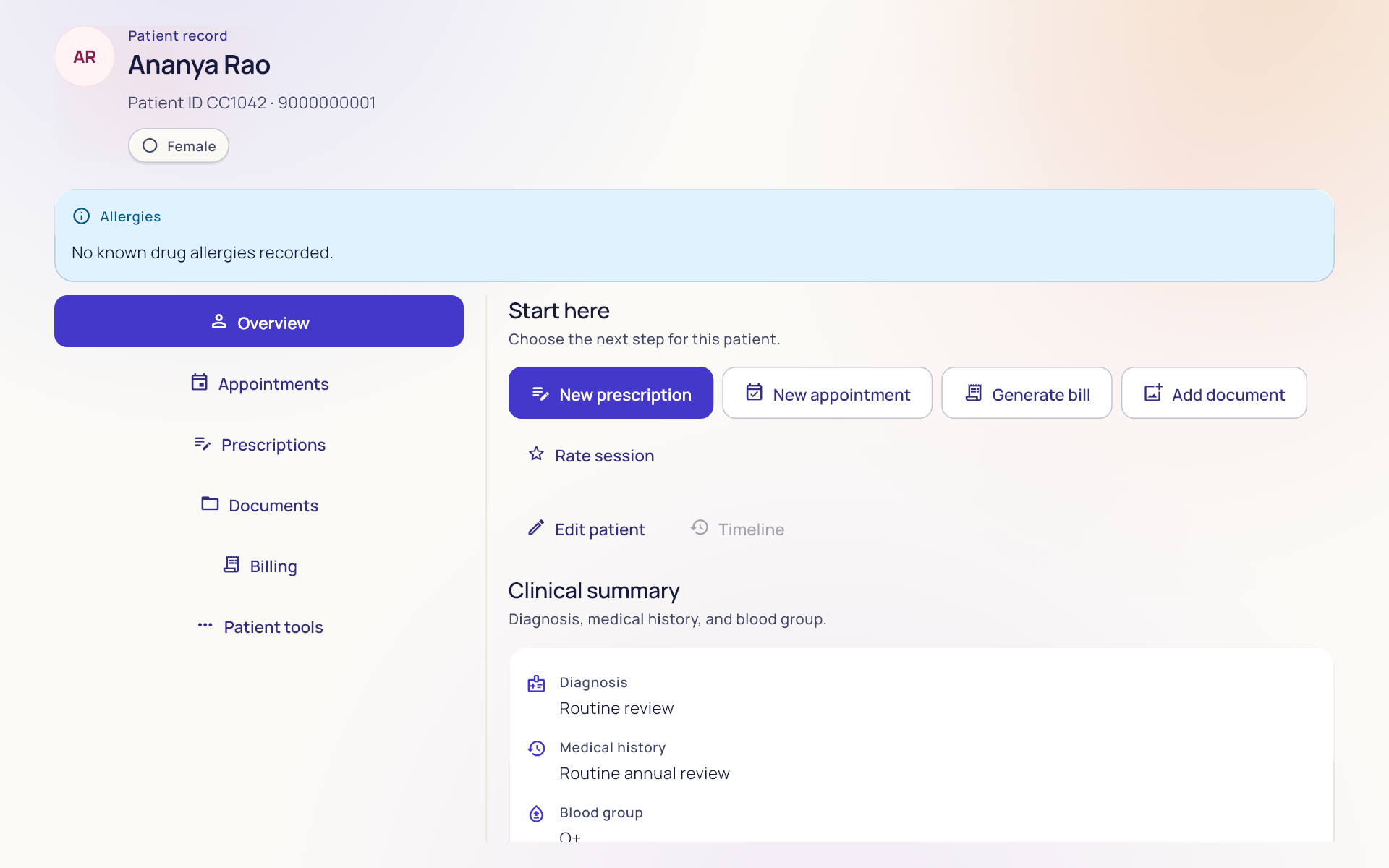
Meet PharmacyCore, our dedicated pharmacy-only app. Find its Android release updates here, alongside ClinicCore.
Ask about PharmacyCoreWe’re working on the Google Play release. PharmacyCore is not on the Play Store yet; its direct APK download is also coming soon.
When the APK becomes available, Chrome may show a generic “File might be harmful” download caution, and Android may ask you to allow installation from the app opening it. These prompts alone do not mean malware was detected.
Download PharmacyCore from clinicoreapp.com. Keep Google Play Protect enabled and allow a scan if offered. If it identifies harmful software or blocks the app, stop and contact us.
Google’s Play Protect guidance ↗*Estimate prescription storage from patients per day, using a 12–15 KB average per visit and 15 GB available. Other records and backups use additional space. Google’s quota is shared across Drive, Gmail and Photos. Explore the estimate ↗
A clinic is more than the sum of its records. It’s a familiar face. A conversation. The next step in someone’s care.
ClinicCore brings the working parts of your clinic together, so the person in front of you can stay at the centre.

Small moments.
A whole day of care.
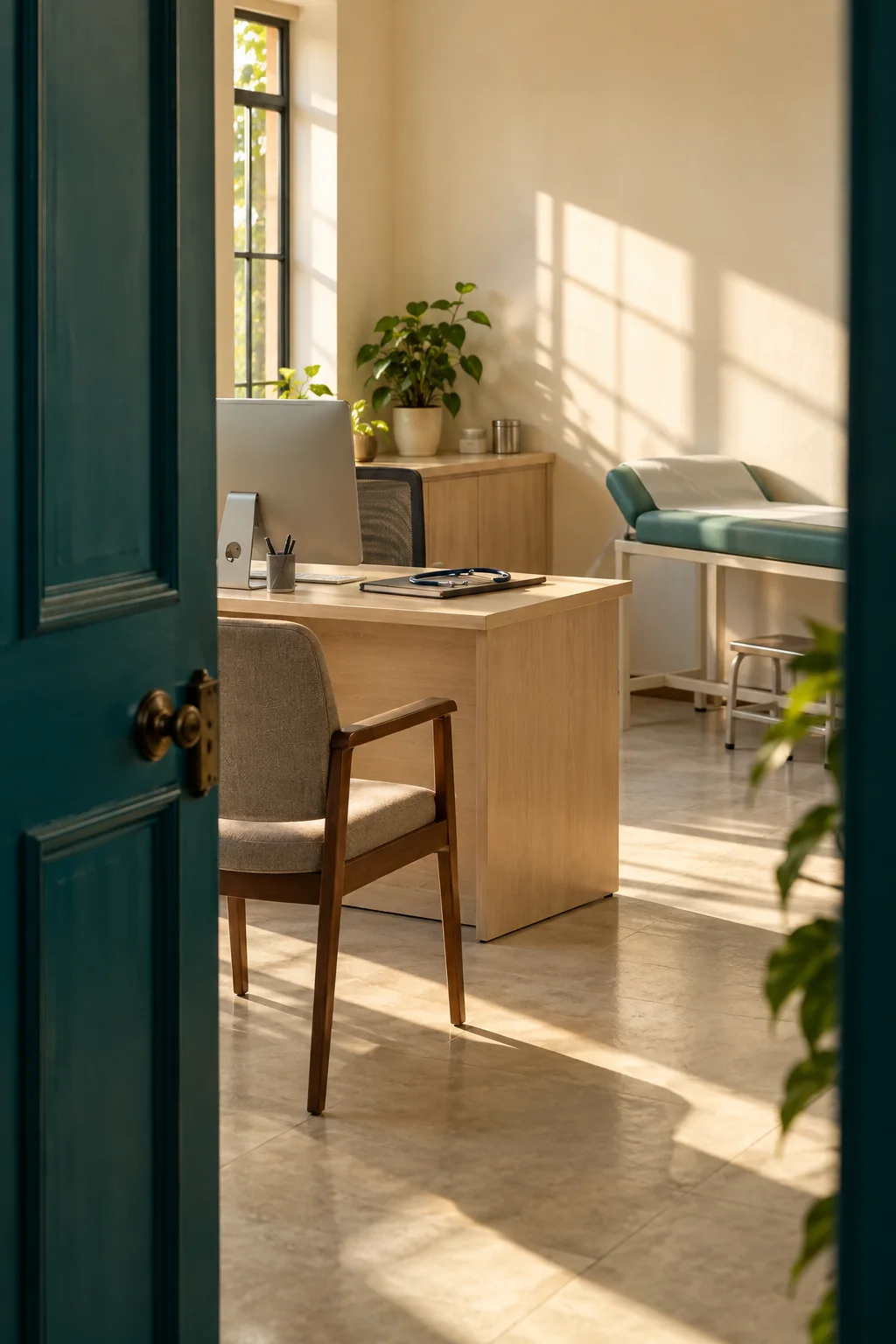
MADE FOR THE WAY A CLINIC REALLY WORKS.
From the waiting room to the next follow-up, keep the details of care close to the work.
Spend less of the consultation searching. Patient details, visit history, documents and the problem list stay in the same working context.
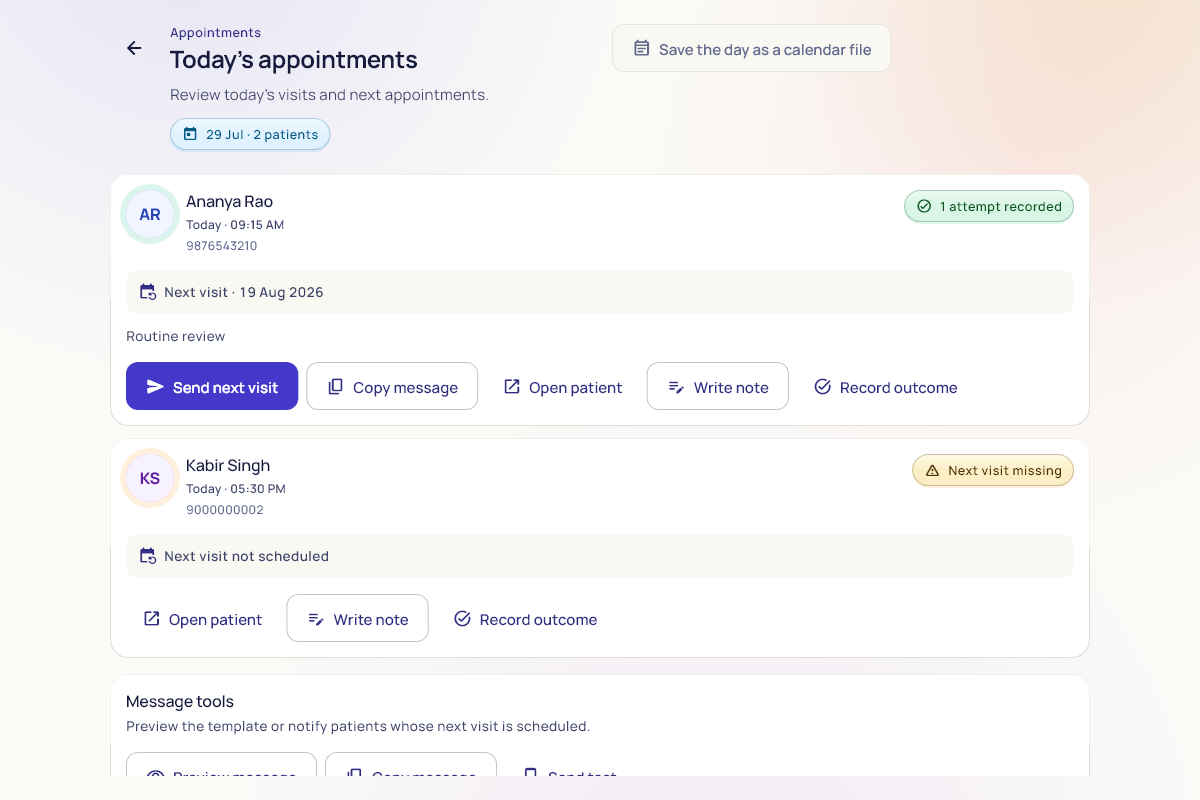
Give reception and the consultation room a clearer day. Manage appointments and the patient queue, then continue into clinical notes and prescriptions.
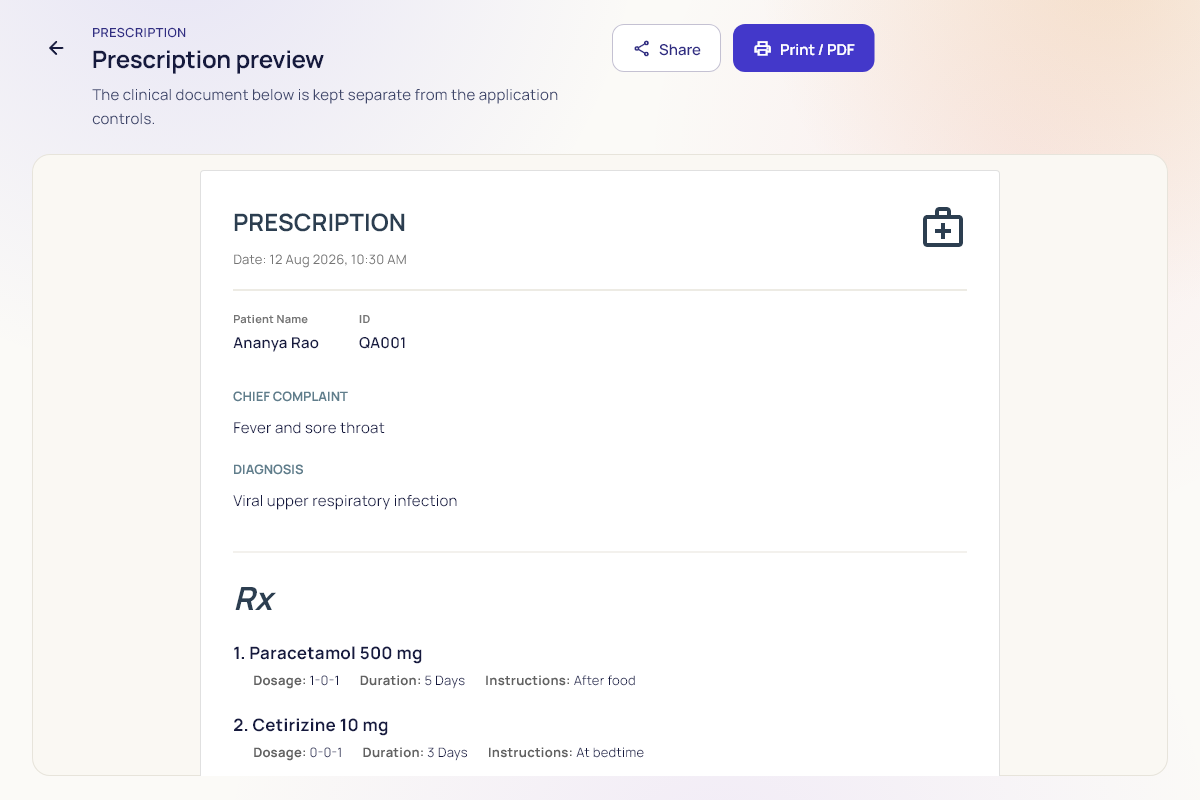
Send the patient away with a clear next step. Create and review prescriptions, prepare a print-ready PDF, and keep the instructions with the visit.
Keep the financial details alongside the day’s work. Record charges and payments, review billing history, and manage clinic stock.
Make the next visit a continuation. Review recalls and reminders, organise follow-ups, and use the communication tools to plan what happens after the visit.
Keep clinical records on your devices, with encrypted local storage, optional Google Drive and LAN sync, and backup and export tools.
Choose a screen. Open the demo. Follow your curiosity.
STEP INSIDE64screens in the browser demo
2native platforms: Windows + Android
A real look around.
At your own pace.
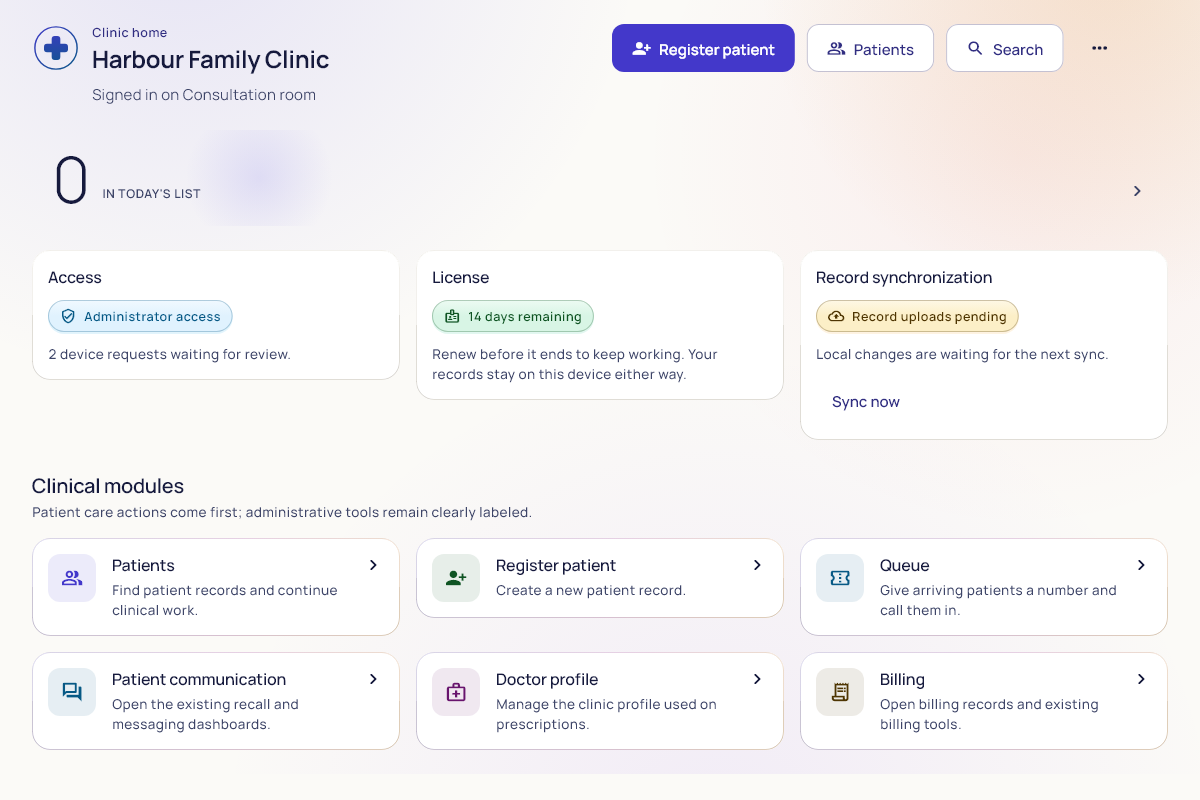
Start from the clinic home, with patient care and administration within reach.
[ YOUR SPACE. YOUR WAY OF WORKING. ]One clinic, up to five authorised devices per licence. Bring Windows and Android together across reception, consultation rooms and the places you work, with optional sync.
From the front desk to your consultation room, choose a mix of Windows and Android devices that fits your practice.
Try a clinic setup. These are examples, not a device enrolment.

Your Windows desk and Android companion. Two places to work, with optional sync between them.
Up to 5 authorised devices per licence, subject to activation. Sync requires setup; Google Drive needs internet, while direct LAN uses the same local network.
Clinical data is stored in an encrypted database on your device. Add sync when your clinic needs it.
Use your available Google storage for optional sync and backups. Your working clinical database stays on your device.
How Google storage works ↗How many patients do you see each day? We’ll estimate prescription storage at an average of 12–15 KB per patient visit, using a mix of compact photos and smaller digital prescriptions.
Count each visit, including returning patients.
| Period | Visits | Data |
|---|---|---|
| Day | ||
| Month 30 days | ||
| Year 365 days |
20 years of prescriptions: 8.8–11 GB.
Visits × 12–15 KB gives the estimated prescription data. We use 30 days for a month and 365 days for a year, assuming you see this many patients every day and save one prescription per visit. Years = 15,000,000 KB ÷ annual prescription data. The shorter estimate uses 15 KB per visit; the longer estimate uses 12 KB.
A compressed prescription image may be around 20–25 KB; digital prescriptions are smaller. The mixed average is a planning assumption, not a measured size for every record. Extra attachments, other records, sync history and retained backup copies use additional space. 1 GB = 1,000 MB; 1 MB = 1,000 KB.
*This estimate assumes the full 15 GB is available for prescriptions. Google’s storage is shared across Drive, Gmail and Photos; other files, records and backup copies reduce the space available. Actual storage needs vary.
Encrypted local records
Saved on this deviceEncrypted local records
Saved on this deviceWith internet available, configured devices can exchange changes through your Google Drive. Direct LAN sync uses your local network.
Choose a route and watch where a sample update goes.
An interactive illustration. No clinical records are created, transferred or stored by this control.
Your clinic’s working database lives locally, protected with encryption.
Google Drive and direct LAN add ways to sync between configured devices.
Use the backup, restore and export tools as part of your clinic’s data routine.
Know what the app uses, and why. Open each point to see the detail.
Your working clinical database is encrypted on your device. Protect device access and keep a suitable backup routine too.
The current Android app does not request access to your contacts, SMS or location. It also avoids broad access to your phone’s storage, microphone and notifications.
Camera features can request camera permission. Network access supports online features. ClinicCore does not require Windows Hello, a fingerprint or a screen-lock prompt to sign in. Connecting Google Drive requires your Google authorisation.
Optional Drive and LAN sync connect configured, authorised devices. Clinic records remain separate from the licensing registry.
Online sign-in, licence activation and Google Drive sync need internet access. Local access depends on your device and licence state. See the questions below for more detail.
A record to return to. A prescription to review. A follow-up to remember. Keep the thread of care with the patient.
Find the patient, review their timeline, and bring the earlier details into today’s conversation.
Good tools should support the people who use them.
And the people they care for.
Take a little time to explore how ClinicCore fits your clinic, before bringing it into your day.
Explore the screens and sample workflows in your browser.
Explore the demo ↗Plan up to five authorised Windows and Android devices for your clinic.
View downloads ↑Arrange licensing and activation, then configure your clinic and users.
Talk to us ↗Bring in patient records, review your setup, and plan backup and sync.
Direct downloads, with the installation details explained before you begin.
We’re working to bring ClinicCore to Google Play for Android and the Microsoft Store for Windows. Direct early-access downloads are available now. Store launch dates are not yet confirmed.
Chrome may show this precaution when downloading an APK outside Google Play. The wording alone does not mean it detected malware, and it is not a safety certificate either.
Check that the address is clinicoreapp.com and the filename begins with ClinicCore.
Android may ask you to allow installation from the app opening the APK. Keep Play Protect enabled and review any specific security alert.
Complete licensing and clinic setup. Camera permission is used by camera features; Google Drive is connected only if you choose it.
Microsoft Store release in progress. We’re working on bringing ClinicCore to the Microsoft Store. Until then, use the portable ZIP below.
This early-access executable is not digitally signed, so Windows or your browser may flag an unknown publisher or an uncommon download. A generic warning is not the same as a confirmed malware detection.
For Windows 10 or 11 on a 64-bit PC. Required runtime files are included.
The ZIP contains ClinicCore.exe and a short getting-started guide.
ClinicCore prepares its files automatically. No separate runtime installation is needed. Complete licensing and clinic setup on first use.
If a security tool identifies specific malware, stop and contact us. Don’t disable your device’s protection.
01A practical introduction to devices, clinic setup and your first records.
Understand local records, Google Drive and your clinic’s local network.
Prepare existing patient information and review it before importing.
Enter your patients per day in the estimator. It uses an average of 12–15 KB per patient visit across compact photo and digital prescriptions. At 100 visits every day, that is about 438–547.5 MB a year, or roughly 27.4–34.2 years of prescription capacity in 15 GB. This is a planning estimate: other records, attachments, sync history, retained backup copies, Gmail and Photos reduce the available space. Calculate your clinic’s estimate.
Up to five authorised devices per licence, with Windows and Android supported. Each device needs activation. Configure Google Drive or direct LAN sync to exchange changes between devices. Picture your clinic setup.
Chrome can show a generic APK warning, and Windows can flag the unsigned early-access executable. These prompts are not, by themselves, confirmed malware findings. Download from clinicoreapp.com, keep device protection enabled, and contact us about any specific malware detection. Read the platform-specific download guide.
A Google Play release is planned. Early access is available through the direct Android APK now. There is no confirmed launch date; availability depends on developer account setup and Google’s review.
We’re working to bring ClinicCore to the Microsoft Store for Windows. It is not available there yet, and there is no confirmed launch date. You can use the direct Windows ZIP for early access in the meantime. Read the Windows download guide.
The Android app uses network capabilities and can use the camera. ClinicCore sign-in does not require fingerprint or screen-lock authentication. Connecting Google Drive requires your authorisation. It does not request contacts, SMS or location access. See what the app uses and why.
ClinicCore is built for Windows and Android. Version 4.2.32 is available for early access. The direct Android APK supports both 32-bit and 64-bit ARM devices and requires Android 7.0 or later. No Firebase signup is needed to download it. Open the downloaded APK and follow Android’s installation prompts. For Windows, download the 64-bit ZIP, extract the entire folder, then open CliniCore.exe. The Windows executable is not digitally signed. Licensing and activation are required; use fictional records while release testing continues.
ClinicCore stores its working clinical database locally, so everyday work with records on an activated device can continue without internet. Online sign-in, licence activation and renewal, and Google Drive sync require a connection. Local access also depends on the licence state; expired licences can restrict editing.
Clinical data is stored in an encrypted local database on your device. If you configure Google Drive sync or backups, those copies use your Google Drive. The licensing registry handles account and device authorisation; it is separate from the clinical record store. You remain responsible for device access and a suitable backup routine.
The browser demo is an interactive walkthrough using fictional data. It lets you explore ClinicCore’s screens and sample flows without installing the app. Native device features, real Google sign-in, printing and production sync need the installed application. Never enter real patient information in the demo.
ClinicCore includes patient CSV import with mapping, preview and review steps. What you can bring in depends on your source file and supported fields. Keep a backup of the original, check the preview, and review rejected or duplicate rows before using imported records.
Contact clinicoreapp@gmail.com for current licensing, activation, supported devices and setup details. We’ll help you understand the requirements for your clinic before you get started.
Take a look around.
Picture a clearer clinic day.